

ChatGPT prompts for students are the single biggest difference between getting a vague, unhelpful response and getting something that genuinely saves you time and improves your work. As an AI educator at AI Genius Optimizer, I have tested hundreds of prompts with students at every level, from first-year undergraduates overwhelmed by essay deadlines to postgraduates trying to structure complex research. The pattern is always the same: better prompts produce better results, full stop.
This guide gives you more than 30 ready-to-use prompts organised by task type. Copy them directly, swap in your subject or topic, and you will notice the difference immediately. I will also show you how to use them so you get the most out of every session.
Why Most Students Get Frustrating Results from ChatGPT
The most common mistake is treating ChatGPT like a search engine. Students type “explain photosynthesis” or “help me write an essay” and then wonder why the output feels generic. ChatGPT is a conversational AI, not a database. It responds to the detail and context you give it.
A good prompt tells ChatGPT three things: who you are, what you need, and what format the response should take. Adding those three layers transforms the quality of what comes back. According to OpenAI’s study mode guidance, using specific context and asking for step-by-step reasoning significantly improves output quality across academic tasks. Verify the exact framing against that page before citing it in your own work, as OpenAI updates its guidance periodically.
Before you ask: using ChatGPT to brainstorm ideas, build study guides, practise for exams, and understand difficult concepts is widely considered acceptable academic use. Submitting AI-generated work as your own is a different matter entirely. The prompts in this guide are designed to help you learn and work more efficiently, not to replace your thinking. Always check your institution’s AI policy before using any AI tool in assessed work, as these vary considerably between universities and are updated frequently.
A Honest Note on Where ChatGPT Falls Short
Before you start using these prompts, it is worth knowing where ChatGPT is unreliable so you do not get caught out.
Factual accuracy: ChatGPT can produce confident-sounding but incorrect information, particularly with specific statistics, publication dates, and named sources. Never include a fact from ChatGPT in submitted work without verifying it against a primary source first.
Citations: ChatGPT can format references and suggest sources, but it occasionally invents author names, publication years, or journal titles that do not exist. Always check every citation it produces against your institution’s referencing guide and the original source.
Subject-specific depth: For highly technical or niche topics, ChatGPT’s knowledge can be shallow or outdated. Use it for structure and ideas, then fill in the substance from your actual course materials and academic sources.
Currency: ChatGPT’s training data has a cutoff date. For recent events, current statistics, or up-to-date research, use it to help you organise what you find elsewhere rather than as a source in itself.
Best ChatGPT Prompts for Students in 2026
Not all ChatGPT prompts produce the same results. The difference between a vague answer and genuinely useful academic support often comes down to how you ask the question. These student-friendly prompts are designed to help you study smarter, improve your writing, prepare for exams, and save time without relying on AI to do the thinking for you.
Essay Writing and Brainstorming Prompts
Essay writing is where most students start, and it is also where the wrong prompt causes the most damage. The prompts below are designed to help you think and plan more effectively, not to write the essay for you. Used well, they will make your own writing sharper.
Brainstorm essay angles
“Give me five different angles I could take for an argumentative essay on [your topic]. For each one, briefly explain the core argument and who might disagree with it.”
Generate a working thesis
“Help me write a thesis statement for an essay about [topic]. My position is [your view]. Make it specific, arguable, and no longer than two sentences.”
Improve a paragraph you have already written
“Here is a paragraph I have written: [paste paragraph]. Please analyse it for clarity, logical flow, and evidence strength. Then rewrite it to improve those areas and explain what you changed and why.”
Break writer’s block
“I am stuck on an introduction for an essay about [topic]. My main argument is [thesis]. Give me three different opening sentences that would hook a reader without being clichéd.”
Check your argument for weaknesses
“Here is my thesis: [paste thesis]. Play devil’s advocate. What are the strongest objections someone could make to this argument, and how might I address them?”
I use a version of that last prompt with my students before they write a single word of their main body. Identifying your weakest points early is far better than discovering them when your lecturer’s feedback comes back.
Study Guide and Revision Prompts
Building your own study materials is one of the most effective revision techniques, and ChatGPT can dramatically speed up the process. The prompts below work best when you paste in your own notes or lecture content rather than asking ChatGPT to generate material from scratch. Your notes are accurate. Generic AI output may not be.
Create a study guide from your notes
“Here are my notes on [topic]: [paste notes]. Turn these into a structured study guide with clear headings, key terms defined in plain English, and the three most important concepts I need to understand for my exam.”
Generate flashcard-style questions
“Turn the following content into 15 flashcard-style questions and answers: [paste your notes or topic]. Make the questions varied, mixing definition, application, and comparison questions.”
Explain a confusing concept three different ways
“I am struggling to understand [concept]. Please explain it three times: once as if I am 12 years old, once at A-level standard, and once at undergraduate level. Then tell me which analogy you think works best and why.”
Make a spaced repetition schedule
“I have [X days] until my [subject] exam. The topics I need to cover are: [list topics]. Build me a study schedule using spaced repetition, with 90-minute sessions and short review windows built in.”
For more on using AI assistants effectively in your studies, take a look at our guide on how to use Claude AI, which covers another powerful tool for academic research and writing tasks.
Research and Note-Taking Prompts
Research tasks are where ChatGPT’s conversational ability really comes into its own. These prompts help you structure and make sense of what you find, not find things for you. Always verify any factual claims against primary sources, and treat any author names or publication details ChatGPT suggests as a starting point for your own search rather than confirmed fact.
Map the academic landscape of a topic
“I am writing a literature review on [topic]. List the major schools of thought or perspectives in this debate. For each one, tell me the core argument, name two or three key thinkers associated with it, and explain how it differs from the others.”
Clean and organise messy notes
“Here are my rough notes from a lecture on [topic]: [paste notes]. Please clean them up. Add a two-sentence overview at the top, use clear subheadings, define any technical terms, and highlight the three main takeaways.”
Summarise a complex source in plain English
“Here is an abstract from an academic paper: [paste abstract]. Summarise the main argument in three sentences a non-specialist could understand. Then tell me what question it leaves unanswered.”
Format a citation quickly
“Please cite this source in [Harvard / APA / Chicago] format: [paste the URL or source details].”
ChatGPT can format citations quickly, but always double-check the output against your institution’s referencing guide. I have seen it occasionally get author order or publication year wrong, especially with older sources. Bear with me on this one: the habit of checking takes 30 seconds and has saved my students from embarrassing footnote errors more than once.

Exam Preparation and Practice Prompts
These prompts turn ChatGPT into a study partner that actively tests you, rather than one that feeds you information to re-read passively. Active recall is one of the most well-evidenced study techniques available, and these prompts put it into practice.
Create a practice quiz
“Based on these topics: [list topics], write a 10-question practice quiz in the style of my [subject] exam. Mix multiple-choice and short-answer questions. Do not give me the answers yet.”
Simulate a viva or oral exam
“Act as an examiner for a [subject] oral exam at [level]. Ask me one question at a time. After each of my answers, give me honest feedback on accuracy, depth, and clarity before moving to the next question.”
Learn by teaching
“I am going to explain [concept] to you as if you are a student who has never heard of it. Ask me follow-up questions like a curious student would, and flag any gaps or errors in my explanation.”
Spot your exam blind spots
“Here is my syllabus for [subject]: [paste syllabus]. Based on typical exam patterns for this kind of course, which three topics am I most likely to underestimate in my revision? Explain why each one tends to trip students up.”
Our article on how to use Gemini AI for free is also worth reading if you want a second AI tool in your study toolkit, particularly for research summaries and factual questions where you need source links.
Productivity and Time Management Prompts
Students often overlook how useful ChatGPT is for the organisational side of academic life. Managing deadlines, breaking down large projects, and processing tutor feedback are areas where a well-structured prompt can save a significant amount of time and reduce a lot of stress. These prompts address exactly that.
Build a realistic study schedule
“Here are my commitments this week: [list them]. I need to fit in [X hours] of study across [subjects]. Build me a realistic daily schedule that includes short breaks and does not have me studying the same subject for more than 90 minutes at a time.”
Break a big project into small steps
“I have a [word count] [essay/report/dissertation] due in [X weeks] on [topic]. Break this project down into manageable steps with a suggested timeline. Make the first step something I can complete in 20 minutes today.”
Handle difficult feedback
“My tutor gave me this feedback on my essay: [paste feedback]. Help me understand exactly what they are asking me to improve, and give me three specific actions I can take to address each point in my next draft.”
How to Use These ChatGPT Prompts for Students Effectively
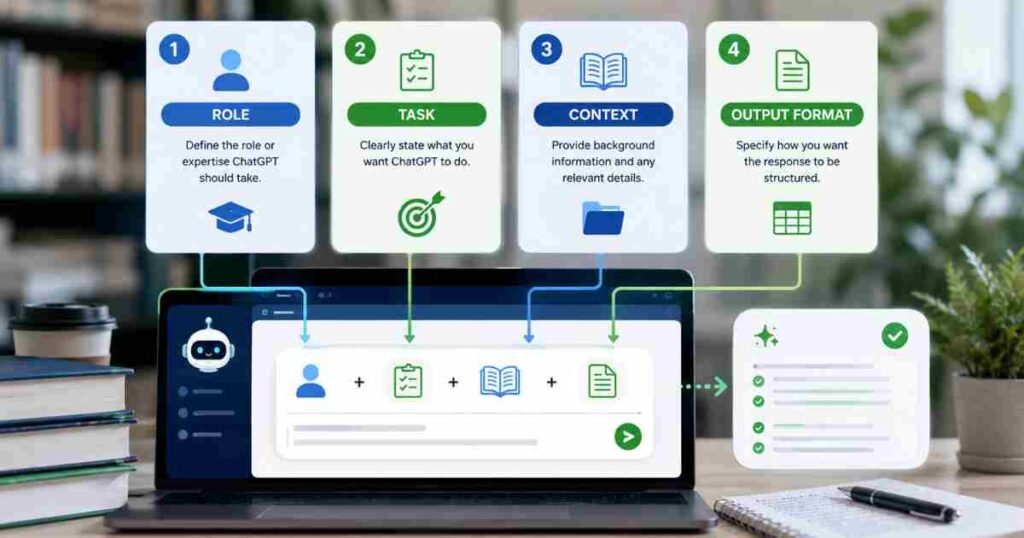
Using these prompts well comes down to a few simple habits.
First, always personalise. Replace the bracketed placeholders with your actual topic, subject, or content. A prompt with specific details will almost always outperform a generic one.
Second, follow up. ChatGPT works best as a conversation. If the first response is not quite right, ask it to go deeper, simplify, or try a different angle. Saying “that is too generic, give me more specific examples” works surprisingly well.
Third, keep your own thinking involved. The prompts in this guide are designed to support your reasoning, not replace it. Use ChatGPT to brainstorm, organise, and practise, then close the tab and write in your own words. That is how you actually learn, and that is what will serve you in an exam hall or an interview room.
Once you have mastered study prompts, you might want to explore our guide on 25 ChatGPT prompts for email writing, which will help you communicate professionally with tutors, employers, and placement supervisors.
Frequently Asked Questions About ChatGPT Prompts for Students
What are the best ChatGPT prompts for students?
The best prompts are specific and contextual. Rather than asking “explain photosynthesis,” ask ChatGPT to explain it at three different levels, or to create a quiz based on your lecture notes. Prompts that include your topic, your academic level, and the format you want consistently produce far more useful results.
Is it cheating to use ChatGPT as a student?
Using ChatGPT to brainstorm, build study guides, practise for exams, or improve your writing process is generally considered acceptable at most institutions. Submitting work generated by ChatGPT and presenting it as your own is academic misconduct. Always check your institution’s specific AI policy, as these vary considerably between universities and are updated frequently.
Can ChatGPT help me revise for exams?
Yes, and it is particularly strong at this. You can use it to create practice quizzes, build structured study guides from your notes, explain confusing concepts in multiple ways, and simulate oral exams. OpenAI’s study mode is specifically designed to support learning through guided questioning rather than giving direct answers. Check the current documentation to confirm how the feature works, as OpenAI updates its products regularly.
What should I not use ChatGPT for as a student?
Do not rely on ChatGPT for verified facts without cross-checking primary sources. It can produce plausible-sounding but inaccurate information, particularly with specific statistics, publication dates, or academic citations. Always verify any factual claim before including it in submitted work. For citation formatting specifically, always check the output against your institution’s referencing guide before using it.
Does ChatGPT have a free plan for students?
Yes. ChatGPT has a free tier with access to its current models, though usage limits apply. ChatGPT Plus costs $20 per month for extended access and additional features, though pricing should be verified at openai.com/pricing before subscribing as rates are subject to change. Many universities also have institutional agreements that provide free or discounted access. Several Russell Group universities in the UK have piloted institutional AI access programmes, so check with your student services team before paying for a personal subscription.
This article was written by Priya Nair, AI Educator at AI Genius Optimizer. Priya has tested hundreds of AI prompts with students across undergraduate and postgraduate levels and writes regularly about practical AI use in education.
We only recommend tools we have personally used and tested. Pricing and platform information was verified at the time of writing. Always check provider websites directly for current details, as features and pricing change regularly.