30 ChatGPT Prompts for Teachers That Actually Work (2026)
June 6, 2026
Inside this Article
Why These ChatGPT Prompts for Teachers Actually Deliver
The best ChatGPT prompts for teachers are the ones you can paste in right now and get something genuinely useful back in under a minute, not another wall of generic text you have to rewrite from scratch.
When I first started experimenting with ChatGPT in the classroom, I spent way too long typing vague requests and getting results that were barely worth editing. The difference between a prompt that works and one that wastes your time is almost always specificity. Give ChatGPT your subject, your year group or grade level, and the exact task. The output jumps from vague to genuinely usable.
According to research from DemandSage’s 2026 AI in Education report, teachers who use AI tools at least weekly save an average of 5.9 hours per week. That adds up to roughly six extra weeks of reclaimed time across a standard school year. The prompts below are structured to help you capture as much of that time as possible.
As an AI educator at AI Genius Optimizer, I have tested hundreds of prompts across different subject areas and year groups. The ones in this list consistently produce outputs that are 70 to 80 percent ready to use. That means less editing, less frustration, and more time for the parts of teaching that actually need you.
Before You Start: How to Get the Best Results
One thing worth knowing before you paste in any of these prompts: ChatGPT responds significantly better when you give it a role. Opening a session with something like “You are an experienced Year 9 English teacher in the UK” will almost always produce a more targeted output than starting cold.
Also, do not accept the first result without reviewing it. These prompts are designed to give you a strong starting draft, not a finished product. Your professional judgment still matters. Check for accuracy, check that the content fits your specific class, and always edit before using anything with students or parents.
Every prompt below works in the free version of ChatGPT at chatgpt.com. You do not need a Plus subscription to get useful results.
Lesson Planning ChatGPT Prompts for Teachers
Lesson planning is where most teachers spend the most time, and it is also where ChatGPT tends to perform best. These prompts save the most planning hours when you fill in the specifics before submitting.
Single Lesson Plan
Act as an experienced [subject] teacher for [Year group or Grade level]. Create a detailed 60-minute lesson plan on [specific topic]. Include: a clear learning objective, a starter activity, the main task with step-by-step instructions, a plenary activity, and one formative assessment idea. The class has 28 students including 4 who need additional support with reading.
Full Unit Plan
Create a 4-week unit plan for [Year group] [subject] on [topic]. For each week, include the main learning focus, three key vocabulary terms students should know, one formative assessment idea, and a suggested homework task.
Flipped Classroom Lesson
Design a flipped classroom lesson for [topic] at [Year or Grade level]. The at-home component should take no more than 10 minutes using freely available resources. The in-class component should be a 40-minute active learning task that builds directly on what students reviewed at home.
Substitute Teacher Plan
Write a self-contained 50-minute lesson plan on [topic] that a substitute teacher with no subject knowledge could deliver. Include step-by-step instructions for the sub, all discussion questions written out in full, and a simple exit activity that requires no marking.
If you are also looking for prompts your students can use independently, our 30+ ChatGPT prompts for students article covers the most effective options by subject and task type.
Differentiation Prompts
Differentiated instruction is one of the most time-consuming parts of planning. These prompts let you create adapted versions of the same material in a fraction of the usual time.
Adapting Materials for Different Reading Levels
I have written the following passage for a Year 8 class. Rewrite it in two versions: one for students reading at a Year 5 level, and one for students working above the Year 8 expected standard. Keep the core information the same in all versions. [Paste your original text here.]
Extension Tasks for Early Finishers
I am teaching [topic] to a Year 10 class. Most students will complete [main task]. Write 3 extension tasks for students who finish early that deepen their understanding of the topic rather than just adding more of the same work.
Scaffolding for Struggling Students
I am teaching [topic] to Year 7. Some of my students struggle with written tasks. Create a scaffolded worksheet that breaks the main activity into smaller steps, includes sentence starters for each step, and uses simple, clear language throughout.
SEND Adaptations
I need to adapt this lesson activity for a student with dyslexia in a Year 9 class. The activity involves reading and annotating a long text. Suggest 3 practical adaptations that reduce the reading burden without changing the core learning objective.
Assessment and Rubric Prompts
Creating rubrics, quizzes, and assessments from scratch takes hours. These prompts cut that down to minutes.
Marking Rubric
Create a marking rubric for a Year 10 [subject] essay on [topic]. The rubric should assess 4 criteria: [list your criteria, e.g. argument quality, use of evidence, structure, language]. Use a 4-point scale: Outstanding, Good, Developing, Beginning. Keep the language accessible enough for students to use the rubric for self-assessment.
Multiple Choice Quiz
Create a 10-question multiple choice quiz on [topic] for Year 8 students. Each question should have 4 options, one correct answer, and one plausible distractor that a student who has not fully understood the material might choose. After the quiz, provide an answer key with a one-sentence explanation for each correct answer.
End-of-Unit Assessment
Design a short end-of-unit assessment for Year 7 on [topic]. Include 5 short answer questions, 2 longer response questions requiring paragraph-length answers, and one optional creative task. The whole assessment should be completable in 45 minutes.
Student Self-Assessment Sheet
Write a self-assessment reflection sheet for Year 9 students to complete after [project or assignment name]. Include 5 questions that ask them to reflect on what went well, what they would change, and one specific thing they want to improve next time. Keep the tone encouraging and the language accessible.
Student Feedback Prompts
Written feedback and progress report comments are two of the most time-consuming admin tasks in teaching. These prompts will not write your feedback for you, but they will give you a strong draft to work from in seconds.
Written Feedback on Student Work
Act as a supportive [subject] teacher. Write feedback for a Year 9 student who submitted the following piece of work: [paste the student’s work here]. The feedback should identify two genuine strengths, one clear area for improvement, and one specific action the student can take before the next assignment.
Progress Report Comments
Write 5 different progress report comments for a Year 10 student who is a solid mid-level performer in [subject]. They engage well in class but their written work lacks depth. Each comment should be 2 to 3 sentences, sound personal rather than templated, and end on a forward-looking note.
Feedback for a Struggling Student
Write constructive feedback for a Year 7 student who is finding [subject] difficult and starting to lose confidence. Their recent work shows real effort but limited progress. The feedback should be honest, encouraging, and include one specific, practical tip they can act on straight away.
End-of-Year Report Comments
I need end-of-year report comments for 3 different student profiles in my Year 8 [subject] class: a high achiever, an average student who has not been working to their potential, and a student who has struggled all year but shown genuine improvement in the final term. Write 2 to 3 sentences for each profile.
Parent Communication Prompts
Parent emails are quick to receive and slow to write. These prompts cover the most common scenarios. If you also want prompts for professional email writing more broadly, our article on ChatGPT prompts for email writing has 25 ready-to-use templates across different contexts.
Concern Email to Parents
Write a professional email to the parents of a Year 9 student who has missed 4 homework assignments in the last 3 weeks. The tone should be concerned but not confrontational. Invite them to respond and suggest a brief meeting if they would like to discuss further.
Positive Update Email
Write a brief, warm email to the parents of a Year 7 student who has shown real improvement this term in [subject]. Keep it to 3 to 4 sentences. It should feel personal and genuine, not like a standard template being sent to every parent.
Explaining a New Unit to Parents
Write a parent-friendly email explaining the new unit starting in [subject] for Year 10. The unit is on [topic]. Include what students will learn, what the main assessment will look like, and one or two ways parents can support learning at home. Keep the total length under 200 words.
Classroom Management Prompts
Classroom Expectations
Help me write a set of 5 classroom expectations for a Year 7 class. They should be positive in tone, easy for students to remember, and cover behaviour, participation, and respect. Write them as “We” statements.
Handling a Difficult Student Conversation
I need to have a difficult one-to-one conversation with a Year 10 student who has been disruptive in class but responds badly to direct criticism. Suggest a structure for a private restorative conversation that is honest, firm, and gives the student space to reflect rather than become defensive.
Writing a Behaviour Report
Write a factual, professional behaviour report entry for a Year 8 student who was involved in the following incident: [briefly describe what happened]. The report should describe the behaviour observed, note any context, and state the action taken. Avoid emotional language.
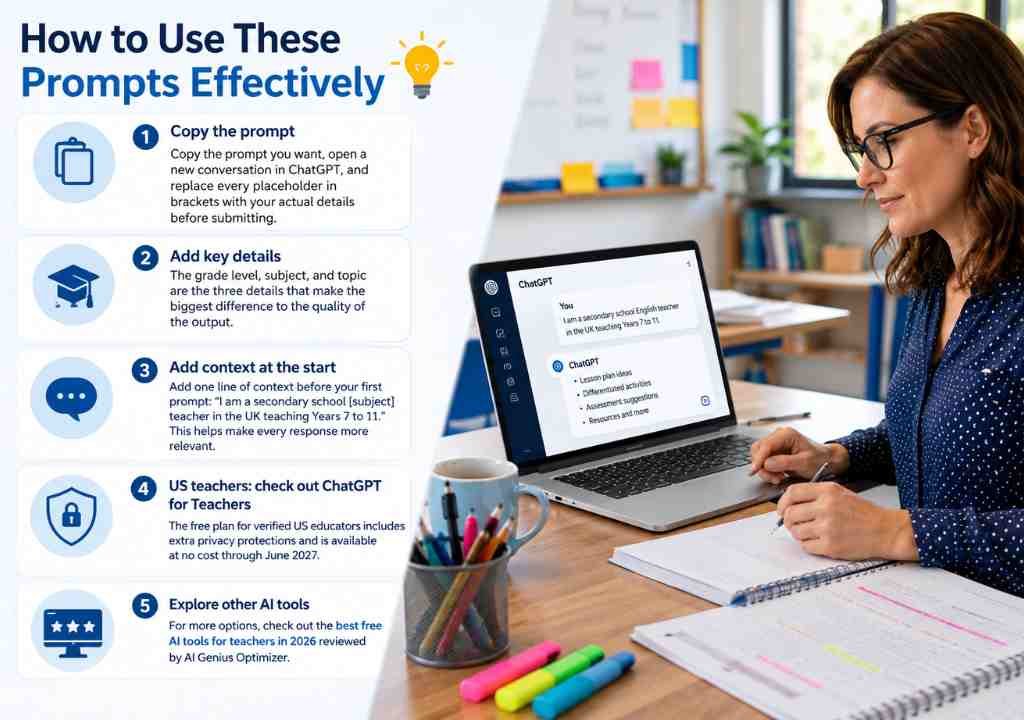
How to Use These Prompts Effectively
Copy the prompt you want, open a new conversation in ChatGPT, and replace every placeholder in brackets with your actual details before submitting. The grade level, subject, and topic are the three details that make the biggest difference to the quality of the output.
Something I do at the start of every session is add one line of context before the first prompt: “I am a secondary school [subject] teacher in the UK teaching Years 7 to 11.” That context carries through the whole conversation and makes every prompt more relevant without having to repeat the information each time.
US K-12 teachers should also look at OpenAI’s free ChatGPT for Teachers plan, available to verified US educators at no cost through June 2027. It includes additional privacy protections designed for school use, including controls that prevent student-related content from being used to train AI models.
For a broader look at which AI tools are worth adding to your classroom toolkit, the AI Genius Optimizer team has also reviewed and ranked the best free AI tools for teachers in 2026, including options beyond ChatGPT.
Frequently Asked Questions About ChatGPT Prompts for Teachers
Are these ChatGPT prompts free to use?
Yes. Every prompt in this article works with the free version of ChatGPT at chatgpt.com. You do not need a Plus or Pro subscription to get useful outputs from any of them. The free tier has usage limits during peak hours, but for everyday planning tasks it is more than sufficient.
How specific do I need to be when writing a prompt?
The more specific, the better. Prompts that include your subject, year group or grade level, and the exact task consistently produce results that need far less editing. The templates above are designed with that specificity built in as placeholders. Fill them in before submitting.
Can I use ChatGPT on a school computer?
This depends on your school or district policy. Many schools now have a formal position on AI tools. Check your institution’s guidelines before using ChatGPT on school devices, and never paste identifiable student information into ChatGPT or any AI platform. Use hypothetical or anonymised descriptions when asking for feedback-related outputs.
How do I get ChatGPT to write in my own tone?
Paste an example of your own writing into the conversation and ask ChatGPT to match your tone. You can also describe your style directly: “Write in a warm, direct tone suitable for secondary school parents.” A short description like that makes a noticeable difference to the output.
Will ChatGPT eventually replace lesson planning?
No, and it should not be expected to. ChatGPT produces solid first drafts quickly, but your professional knowledge of your students, your curriculum, and your school’s expectations is still essential at every stage. Think of it as a very fast first draft, not a finished product ready to hand to students.
The 30 prompts above cover most of what takes up a teacher’s planning and admin time. Start with one category that gives you the most immediate value, test two or three prompts this week, and adapt them for your class and context. The more specific your prompts, the better the results will be.
This article was written by Priya Nair for AI Genius Optimizer. We only recommend tools we have personally used and tested.
Get one genuinely useful AI tip every week. Free, no spam, unsubscribe any time.