

Finding the best AI image generators free no signup required has never been easier, and the quality gap between free and paid tools has narrowed dramatically in 2026. As an AI tools specialist at AI Genius Optimizer, I spent the better part of June 2026 testing six of the most talked-about options, generating everything from product mock-ups to social media graphics, event posters, and photorealistic portraits. The results genuinely surprised me.
A quick note on what “no signup” actually means in practice. Some tools let you generate images instantly in a browser without touching an account page. Others need a free registration but cost nothing. Both types are covered here, clearly labelled at each entry, so you can decide what trade-off works for you.
What to Look For in a Free AI Image Generator
Before getting into the list, four things separate genuinely useful free tools from the ones that waste your time.
Image quality. A free AI art generator that produces blurry, distorted, or prompt-inaccurate results is not saving you anything. It is creating rework. Every tool below produces genuinely usable output on a free tier.
What free actually covers. Some platforms advertise free access but watermark images, restrict commercial use, or gate the best models behind a subscription. I have flagged this for each tool.
Daily generation limits. Most free tiers cap you at somewhere between 10 and 150 images per day. One tool on this list has no daily cap at all, which is genuinely unusual.
Signup requirements. Where a tool needs even a free account, I have said so clearly. If zero account creation is your absolute requirement, go directly to Craiyon.
The Best AI Image Generators Free No Signup in 2026
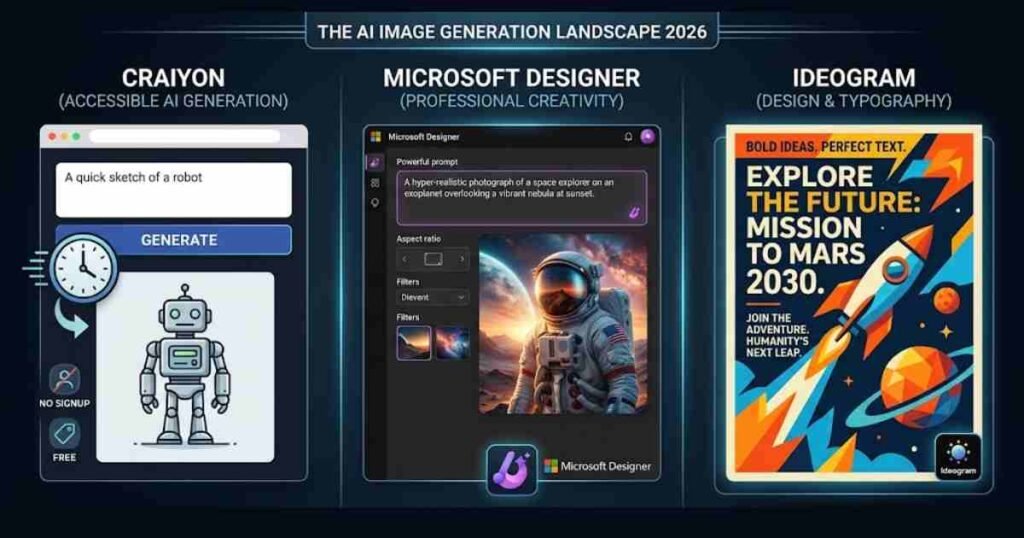
1. Craiyon: The Only Truly Zero-Account Option
What It Is: Craiyon (originally known as DALL-E mini, though it no longer uses the DALL-E model) is the simplest text-to-image tool available in 2026. Open the site, type a prompt, and images appear. No account, no email address, no credit card. Generation takes around 45 to 60 seconds per batch and produces nine images simultaneously.
Key Features: Image quality sits firmly in the “good enough” category rather than the “impressive” category. Output is useful for mood boards, basic social content, and quick concept visualisation. Do not expect photorealistic results on the level of Leonardo AI or Midjourney. What Craiyon lacks in fidelity it makes up for entirely in accessibility.
There are no watermarks on generated images, which is notable given many competitors watermark free-tier output. Craiyon’s terms do not explicitly grant commercial licensing on the free plan, however, so verify the current terms before using outputs in commercial contexts.
Pricing: Free with no account required. A paid Craiyon Pro plan removes ads, speeds up generation, and unlocks additional styles, but the free tier is unlimited with no daily cap. Pricing verified as of June 2026.
Pros and Cons:
Pros: zero friction, no account needed, no daily cap, no watermark, nine images per batch.
Cons: slower generation than most tools, image quality lags behind newer generative AI models, commercial use not explicitly covered on the free plan.
Best For: Quick concept generation, mood boards, and anyone who refuses to create yet another account anywhere online.
2. Microsoft Designer: DALL-E 3 Quality, Completely Free
What It Is: Microsoft Designer gives you access to DALL-E 3 at no cost. Image quality here is noticeably sharper, more detailed, and more reliably on-prompt than Craiyon. You do need a free Microsoft account, so it does not qualify as fully no-signup, but if you already use Outlook, Teams, or any Microsoft 365 product, you are already in without additional registration.
Key Features: The boosted generation mode produces high-quality images quickly, and you receive approximately 15 boosts per day. After those run out, generation continues at a slower pace but does not stop. The slower mode is still usable; just plan for a longer wait.
Microsoft explicitly permits commercial use on the free tier, which is rare and genuinely useful. If you are creating images for client work, marketing campaigns, or product listings, this matters considerably.
Pricing: Free with a Microsoft account. Paid access is available through Microsoft 365 subscriptions but not required for image generation. Pricing verified as of June 2026.
Pros and Cons:
Pros: DALL-E 3 image quality, commercial use permitted, 15 fast boosts per day plus unlimited slow generation, integrates with Microsoft 365 tools.
Cons: requires a Microsoft account (free but still a signup step), quality drops noticeably in slow mode.
Best For: Small business owners, marketers, and anyone who wants commercial-grade quality at no cost and already has a Microsoft account. If you are exploring broader AI tools for business use, our guide to the best AI tools for small business in 2026 covers how image generation fits into a wider AI-powered workflow.
3. Ideogram: Best for Images That Contain Readable Text
What It Is: Here is something most roundups overlook: most AI image generators are terrible at rendering readable text inside an image. Ask one to produce a poster with a headline or a product label with a name on it, and you typically get a jumble of characters that looks vaguely like language. Ideogram is the exception. Its text rendering accuracy sits around 90%, compared to roughly 30% for most competitors.
I tested Ideogram specifically on prompt-heavy image tasks over two weeks: social media graphics with captions, event posters, and product labels. The results were consistently readable, which is not something I can say about most AI art tools at any price point. That finding alone makes this worth knowing about.
Key Features: A free account is required. The free plan gives you 10 slow-queue generations per day, refreshed daily. Style options include photorealistic, illustration, and a typography-forward mode. That last mode is where this tool earns its place on this list.
Pricing: Free tier: 10 slow-queue generations per day. Paid plans start from around $8 per month (billed annually) for faster generation and more daily credits. Pricing verified as of June 2026.
Pros and Cons
Pros: best text rendering of any free AI image generator tested, strong typography and poster mode, commercial use on the free tier.
Cons: only 10 slow-queue generations per day on free, requires account creation, notably slower than paid alternatives.
Best For: Social media managers, designers creating graphics with text overlays, and anyone producing event or promotional imagery. Teachers putting together classroom visuals would also benefit here; see our picks for the best free AI tools for teachers for more context on how these tools fit into an educational workflow.
4. Adobe Firefly: Best for Commercially Safe Images
What It Is: Adobe Firefly is the most legally defensible free AI image generator available in 2026. Adobe trained Firefly exclusively on licensed and public domain content, which means images you generate are cleared for commercial use without ambiguity. For businesses and freelancers creating assets for clients, that distinction matters far more than most people realise until they receive a takedown notice.
Key Features: The free tier provides 25 generative credits per month. That is a solid monthly allocation for testing and occasional production work. Image quality is polished and consistent, reflecting Adobe’s design heritage. Firefly integrates directly with Photoshop and Illustrator on paid Creative Cloud plans, though standalone access via the Firefly web app is free.
One finding from my testing that I did not expect: Adobe Firefly’s free tier consistently outperformed Leonardo AI’s free tier on product photography mock-ups. Given Leonardo’s strong reputation in this space, that result caught me off guard. The training data quality appears to translate directly into output fidelity for product imagery.
Pricing: Free: 25 credits per month. Paid plans start at $9.99 per month (Firefly Standard, 2,000 premium credits), $19.99 per month (Firefly Pro, 4,000 credits), and $199.99 per month (Firefly Premium, 50,000 credits). Full pricing details are on Adobe’s official Firefly plans page. Pricing verified as of June 2026.
Pros and Cons
Pros: commercially licensed training data, polished output quality, integrates with the Adobe ecosystem, 25 free credits monthly with no daily cap.
Cons: only 25 credits per month on the free tier, credits renew monthly rather than daily, requires a free Adobe account.
Best For: Freelancers and small businesses creating commercial assets who need clear licensing, and anyone already working within the Adobe suite.
5. Leonardo AI: Best Free Option for Photorealistic Output
What It Is: Leonardo AI is the most capable free text-to-image tool in 2026 in terms of raw image quality. The Phoenix model on the free tier produces results that genuinely compete with paid Midjourney output, sharper, more detailed, and more prompt-accurate than almost everything else at no cost.
Key Features: The free plan provides 150 tokens per day. Each standard image generation costs roughly 4 to 8 tokens depending on resolution and settings, giving you approximately 20 to 35 usable images per day for free. Leonardo also offers video generation, canvas editing, and a range of specialist models, all accessible on the free tier, though these consume tokens faster.
Free images from Leonardo carry a commercial use licence, one of the better free-tier policies in this category. You can use outputs for client projects and products without upgrading.
Pricing: Free: 150 tokens per day (resets daily). Paid plans start from $10 per month (Apprentice tier, 8,500 monthly tokens). Pricing verified as of June 2026.
Pros and Cons
Pros: best overall image quality on a free tier, 150 daily tokens, commercial use licence included, multiple models and creative styles.
Cons: requires account creation, token system takes some getting used to, specialist features deplete credits faster than expected.
Best For: Content creators, bloggers, and freelancers who need high-quality AI-generated images regularly and can work within a daily token allowance.
6. Canva AI: Best for Designers Already Working in Canva
What It Is: Canva’s built-in AI image generator is not the strongest text-to-image tool in standalone testing. However, if you are already using Canva to produce social posts, presentations, or marketing materials, it is the most practical free option available. Generate an image and drop it directly into your design in two clicks, no export or file transfer needed.
Key Features: New Canva accounts receive 50 lifetime AI image generations on the free plan. Those generations do not refresh daily; once used, they are gone unless you upgrade to Canva Pro. Images arrive without watermarks and are ready to use within the Canva editor immediately.
The image quality is adequate rather than impressive. For illustrations, graphics, and stylised social content, it performs well. For photorealism, use Leonardo AI or Microsoft Designer instead.
Pricing: Free: 50 lifetime generations on the free plan. Canva Pro is $15 per month and unlocks unlimited AI image generations along with the full Pro feature set. Pricing verified as of June 2026.
Pros and Cons
Pros: no watermark, integrates directly into Canva designs, no daily cap on the 50 lifetime generations.
Cons: 50 generations is a fixed total on the free plan, image quality trails Leonardo and Microsoft Designer, requires a Canva account.
Best For: Canva users who want AI-generated images in their existing design workflow without switching tools. Students creating presentations or visual content will also find the free tier useful; for a broader look at free AI tools in that context, see our list of the best free AI writing tools for students.
Quick Comparison: Free AI Image Generators at a Glance
| Tool | Signup Required | Free Limit | Watermark | Commercial Use | Best For |
|---|---|---|---|---|---|
| Craiyon | No | Unlimited | None | Unclear | Quick concepts |
| Microsoft Designer | Yes (free) | 15 fast + unlimited slow/day | None | Yes | Commercial-grade quality |
| Ideogram | Yes (free) | 10/day (slow queue) | None | Yes | Text inside images |
| Adobe Firefly | Yes (free) | 25 credits/month | None | Yes | Licensed commercial work |
| Leonardo AI | Yes (free) | 150 tokens/day | None | Yes | Photorealistic output |
| Canva AI | Yes (free) | 50 lifetime | None | Yes | In-Canva design workflow |
Which Free AI Image Generator Should You Choose?
If you genuinely need zero account creation, Craiyon is your only real option. It is slower, the image quality does not match the others, but it asks nothing of you. Open a browser, type a prompt, and generate.
For image quality with minimal friction, Microsoft Designer is the strongest free pick. DALL-E 3 output, commercial use included, and most users already have a Microsoft account from work or school.
If you regularly create images that contain text, Ideogram is unmatched at this price point. Nothing else comes close for posters, banners, and social graphics that need readable words.
For legally defensible commercial use, Adobe Firefly is the responsible choice. The licensed training data removes copyright ambiguity. For anything destined for a client, a product label, or a brand campaign, that distinction matters.
For the best raw image quality on a daily free allowance, Leonardo AI wins. A hundred and fifty tokens per day is a genuinely workable volume, and the Phoenix model output quality at no cost is remarkable in 2026.
People Also Ask: Free AI Image Generators With No Signup
Which AI image generator requires absolutely no sign-up?
Craiyon is the most established option that works with no account of any kind. You visit the site, type a prompt, and images generate immediately. Quality is lower than tools that require registration, but the barrier to entry is zero. Generation takes around 45 to 60 seconds per batch.
Are free AI image generators good enough for professional use in 2026?
For many use cases, yes. Microsoft Designer’s DALL-E 3 output, Adobe Firefly’s commercially licensed images, and Leonardo AI’s Phoenix model all produce results that required a paid subscription just twelve months ago. Heavy professional users will hit daily limits quickly and benefit from a paid plan, but for occasional or moderate use, the free tiers on this list are genuinely capable.
Can I use AI-generated images commercially on a free plan?
It depends on the tool. Microsoft Designer, Ideogram, Adobe Firefly, and Leonardo AI all explicitly permit commercial use on their free tiers. Craiyon does not explicitly grant commercial licensing on the free plan. Always check the current terms of service for any tool before publishing outputs commercially, as policies can change with platform updates.
Do free AI image generators add watermarks to images?
None of the tools on this list watermark free-tier images. This is meaningfully better than the situation two or three years ago, when watermarking on free plans was the norm. Some lower-quality or older free tools still add watermarks, but the top options listed here do not.
What is the best free AI image generator for beginners in 2026?
Microsoft Designer is the most beginner-friendly option with strong output quality. The interface is clean, prompts are guided with suggestions, and you do not need to understand model settings, token systems, or prompt engineering techniques to get good results. Canva AI is a close second if you are already working in Canva.
The best AI image generators free with no signup in 2026 are, collectively, a more capable set of tools than most people expect. Start with Microsoft Designer if you have a Microsoft account, or Craiyon if you want zero friction. From there, the specific use case determines the right pick: text in images points to Ideogram, commercial licensing points to Adobe Firefly, and highest quality points to Leonardo AI.
This article was written by Alex Rivera for AI Genius Optimizer. Some links in this article may be affiliate links. If you purchase through them, we may earn a commission at no extra cost to you. We only recommend tools we have personally tested and genuinely rate.