
The best AI tools for freelancers in 2026 are not the ones with the loudest marketing budgets. After running dozens of platforms against real client work, I have narrowed the field to seven that consistently earn their subscription fee. As an AI tools specialist at AI Genius Optimizer, I have tested over two hundred AI products, and freelancers ask me one question more than any other: which tools actually pay for themselves? This list answers that, with pricing verified on 12 June 2026 and honest notes on who should skip each pick.
One finding surprised me before we even start. The tool that saved me the most billable hours was not a writing assistant at all. Bear with me on this one, because the admin category is where most freelancers are quietly losing a full working day every week.
How I Chose the Best AI Tools for Freelancers
Every tool here went through at least four weeks of use inside a genuine freelance workflow: client research, proposal writing, content production, design assets, meeting notes, and invoicing. I checked each official pricing page on 12 June 2026, so the figures below reflect current rates rather than recycled numbers from 2024 roundups.
Selection came down to three questions. Does the free tier do useful work on its own? Does the paid tier return more value than it costs? Can a solo worker learn it in an afternoon without an IT department? Tools that failed any of these did not make the cut, however popular they might be.
1. ChatGPT: Best All-Round Assistant
ChatGPT remains the default starting point, and in 2026 the pricing finally fits freelance budgets. OpenAI rolled out the ChatGPT Go plan worldwide, an $8 per month tier that sits between the free plan and Plus. For drafting proposals, summarising briefs, brainstorming angles, and writing client emails, Go covers the vast majority of freelance use.
Here is the counterintuitive part: most freelancers I speak to do not need the $20 per month Plus plan. Unless you lean heavily on advanced reasoning models, file analysis, or custom GPTs every single day, Go does the job at less than half the price. Plus is worth it for power users; Pro tiers ($100 and $200 per month, billed monthly) are aimed at heavy professional workloads rather than typical solo work.
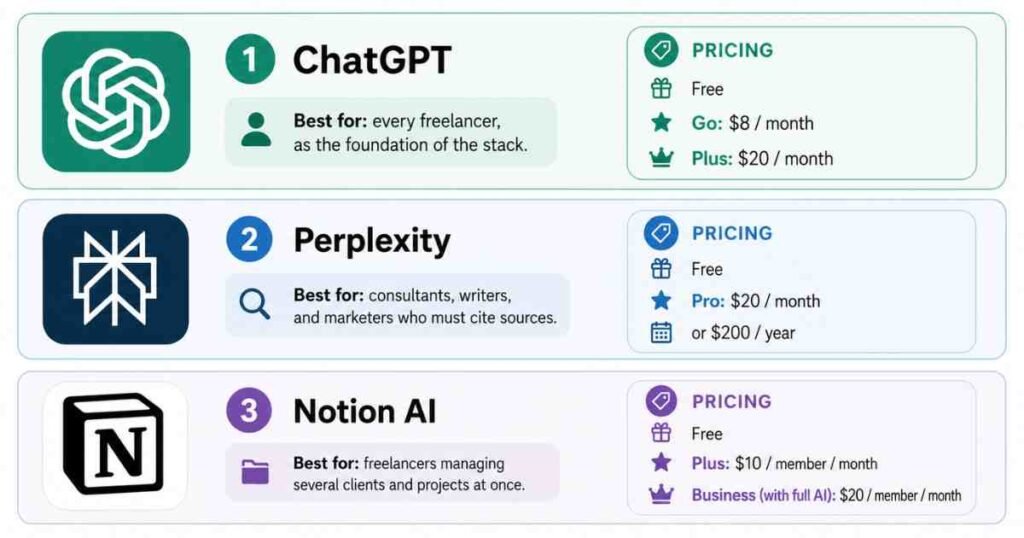
Best for: every freelancer, as the foundation of the stack.
Pricing: Free; Go at $8 per month; Plus at $20 per month, both billed monthly. Pricing verified as of 12 June 2026.
2. Perplexity: Best for Client and Market Research
Research is where generative AI quietly earns its keep, because billable research time is often invisible to clients. Perplexity answers questions with cited, current sources, which means you can verify every claim before it goes into a deliverable. I covered the platform in depth in my Perplexity AI review, and months later it is still the first tab I open when a new client brief lands.
The free plan is generous enough for occasional research. Pro, at $20 per month or $200 per year, adds the stronger models and a much higher limit on advanced searches, which matters if research is a core part of your service.
Best for: consultants, writers, and marketers who must cite sources.
Pricing: Free; Pro at $20 per month, or $200 billed annually. Pricing verified as of 12 June 2026.
3. Notion AI: Best for Projects and Organisation
Freelancing is a juggling act, and Notion is where I keep every client, deadline, and deliverable in one workspace. The AI layer drafts documents, autofills databases, and answers questions about your own notes. AI Meeting Notes, included on the Business plan, transcribes and summarises calls without a separate tool.
A note on pricing, because it changed and most older articles still get this wrong. Notion now bundles full AI into the Business plan at $20 per member per month, while the $10 Plus plan only includes a trial of the AI features. My full Notion AI review covers what that buys you in practice.
Best for: freelancers managing several clients and projects at once.
Pricing: Free; Plus at $10 per member per month; Business with full AI at $20 per member per month, billed annually. Pricing verified as of 12 June 2026.
4. Canva Magic Studio: Best for Design
Non-designers still need to ship professional visuals, and Canva’s Magic Studio is the fastest route I have found. The Pro plan unlocks more than 20 AI features, including Magic Write for copy, background removal, image generation, and design resizing across formats. During a four-week test I produced social graphics, a client pitch deck, and proposal covers without opening any other design software.
Canva Pro now costs $15 per month billed monthly, or $120 per year, after the 2025 price rise. The free tier remains genuinely useful, which is rare in this category. If you only need occasional AI images rather than a full design suite, our roundup of the best free AI image generators with no signup may save you the subscription entirely.
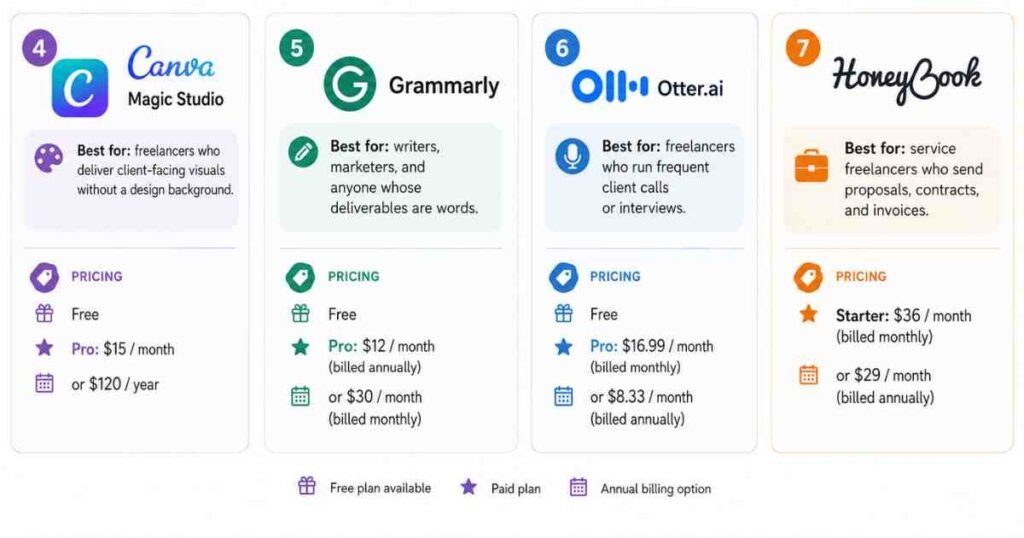
Best for: freelancers who deliver client-facing visuals without a design background.
Pricing: Free; Pro at $15 per month billed monthly, or $120 billed annually. Pricing verified as of 12 June 2026.
5. Grammarly: Best for Editing and Proofreading
Typos in a proposal cost work, and a dedicated proofreader still beats asking a chatbot to check its own writing. Grammarly sits in your browser and catches errors everywhere you type: emails, documents, LinkedIn, project tools. The Pro plan adds tone rewriting, full-sentence suggestions, and plagiarism detection.
Watch the billing carefully here. Pro works out at $12 per month only when billed annually ($144 per year); the genuine month-to-month price is $30. That gap is the largest of any tool on this list, so commit annually or stay on the free plan.
Best for: writers, marketers, and anyone whose deliverables are words.
Pricing: Free; Pro at $12 per month billed annually, or $30 billed monthly. Pricing verified as of 12 June 2026.
6. Otter.ai: Best for Client Meetings
Taking notes during a discovery call splits your attention exactly when you need it least. Otter joins your meetings, transcribes them live, and produces summaries with action items, so you can stay present and still capture every requirement. In my experience the transcripts need a light skim for names and jargon, but the action-item capture has been reliably accurate.
The Pro plan includes 1,200 transcription minutes per month, roughly 20 hours of calls, which comfortably covers a full freelance schedule. Current rates are listed on the official Otter pricing page.
Best for: freelancers who run frequent client calls or interviews.
Pricing: Free; Pro at $16.99 per month billed monthly, or $8.33 per month billed annually. Pricing verified as of 12 June 2026.
7. HoneyBook: Best for Client Admin and Invoicing
This is the tool I trailed at the top. HoneyBook handles proposals, contracts, invoicing, payments, and follow-ups in one place, and its 2026 AI update drafts client emails, captures meeting notes, and flags which leads are most likely to convert. Over four weeks it pulled roughly six hours of admin out of my week, which is more measurable time than any writing assistant returned.
Pricing starts at $36 per month billed monthly, or $29 per month on annual billing, and unlimited clients are included from the Starter tier. For a freelancer earning even modest day rates, recovering a few admin hours a month covers the cost several times over.
Best for: service freelancers who send proposals, contracts, and invoices.
Pricing: Starter at $36 per month billed monthly, or $29 per month billed annually. Pricing verified as of 12 June 2026.
Quick Comparison Table
| Tool | Best For | Free Tier | Paid From (Monthly Billing) |
|---|---|---|---|
| ChatGPT | All-round assistant | Yes | $8 per month (Go) |
| Perplexity | Cited research | Yes | $20 per month (Pro) |
| Notion AI | Projects and organisation | Yes | $20 per member per month (Business, annual) |
| Canva Magic Studio | Design | Yes | $15 per month (Pro) |
| Grammarly | Editing and proofreading | Yes | $30 per month, or $12 annual (Pro) |
| Otter.ai | Meeting transcription | Yes | $16.99 per month (Pro) |
| HoneyBook | Client admin and invoicing | No (free trial) | $36 per month (Starter) |
Which Should You Choose?
The best AI tools for freelancers depend entirely on what you sell. Start with one general assistant and one specialist, not seven subscriptions. A writer pairs ChatGPT Go with Grammarly for around $20 per month total. A consultant pairs Perplexity Pro with Otter. A designer-adjacent freelancer leans on Canva Pro. Service freelancers drowning in admin should trial HoneyBook before anything else, because admin hours are the easiest savings to measure.
If your freelance work is growing into a small operation with contractors or staff, the calculus shifts towards team features, and our guide to the best AI tools for small business in 2026 covers that next step.
Frequently Asked Questions About Best AI Tools for Freelancers
What is the best free AI tool for freelancers?
ChatGPT’s free plan is the strongest starting point because it handles writing, brainstorming, and research support in one place. Perplexity’s free tier is the best no-cost option for research with cited sources, and Canva’s free plan covers basic design work.
How much should a freelancer spend on AI tools per month?
Between $20 and $50 per month covers a strong stack in 2026. Most freelancers do well with one general assistant such as ChatGPT Go at $8, plus one specialist tool matched to their main service. Spending beyond $50 only makes sense once a specific tool is demonstrably saving billable hours.
Can AI tools replace freelancers?
No. Clients hire freelancers for judgement, accountability, and context, none of which these platforms provide on their own. The freelancers winning work in 2026 are the ones using AI to deliver faster and spend more of their time on the parts clients actually value.
Do clients mind if freelancers use AI?
Most clients care about the quality of the result rather than the process, but transparency matters in regulated industries and in work sold explicitly as fully human-made. A simple line in your contract about how you use AI tools prevents awkward conversations later.
Which AI tool is best for freelance writers specifically?
A combination beats any single tool: ChatGPT or a similar assistant for drafting and ideation, Grammarly Pro for editing, and Perplexity for research you can cite. That trio costs roughly $40 per month on annual billing and covers the full writing workflow.
Final Thoughts
The best AI tools for freelancers in 2026 are the ones you will still be using in three months. Pick the one tool that targets your biggest weekly time sink, run it for a month, and measure the hours it returns before adding anything else. A small stack you actually use beats a long list of subscriptions you forgot about.
This article was written by Alex Rivera for AI Genius Optimizer. Some links may be affiliate links. We only recommend tools we have personally tested.