
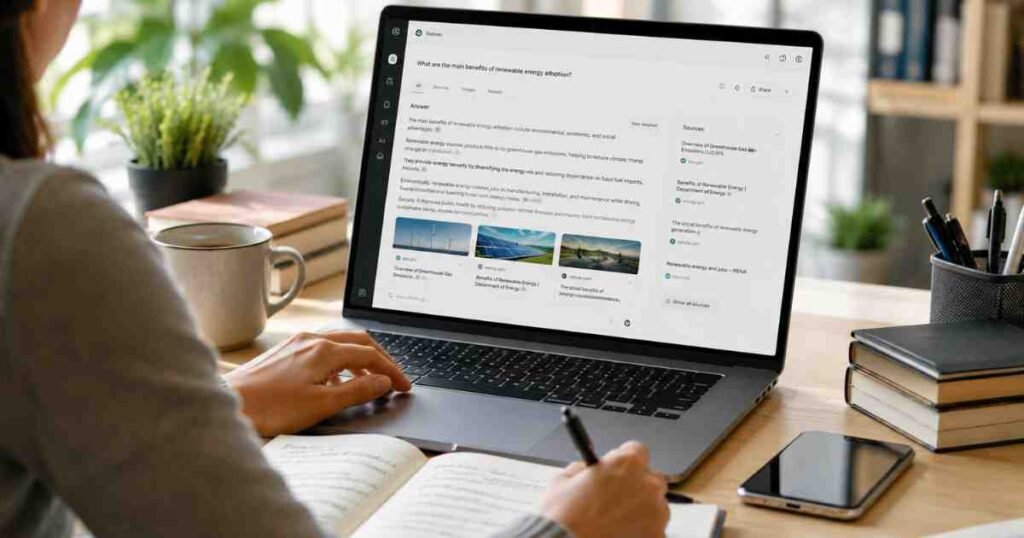
If you have been curious about how to use Perplexity AI but are not sure where to start, you are in exactly the right place. Perplexity AI is one of the most beginner-friendly AI research tools available right now, and the good news is that you can get going completely for free, with no credit card and no countdown timer. You simply sign up, type a question, and get a clear, sourced answer within seconds.
I use Perplexity AI with my students almost every week. It is usually the first AI tool I recommend to anyone who is new to this space, because it is immediately useful and genuinely easy to understand. You type a question, you get an answer, and every claim comes with numbered citations so you can verify the source yourself. That transparency alone sets it apart from most AI tools I have tested.
What Is Perplexity AI?
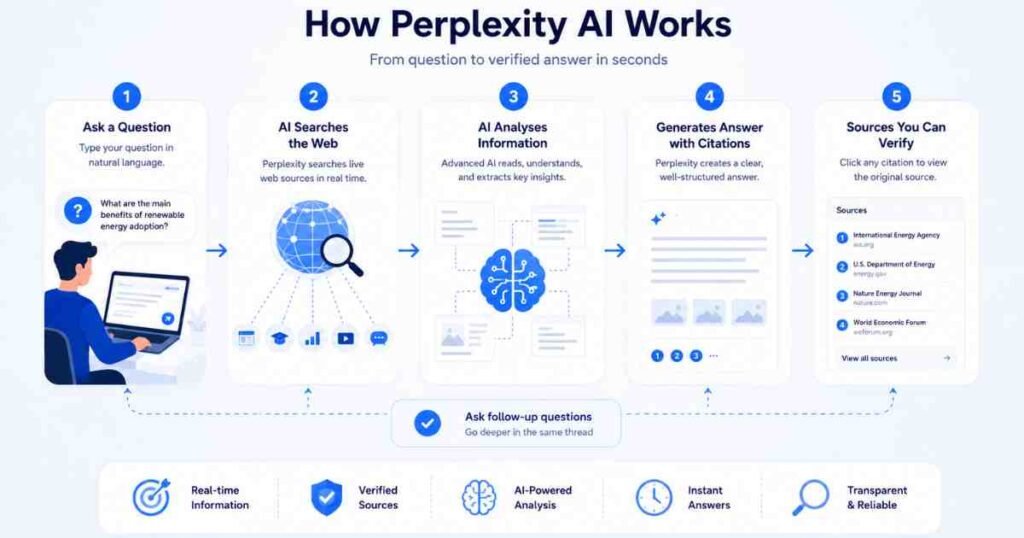
Perplexity AI is an AI-powered search engine that answers questions in real time by searching the web and summarising the most relevant results into a clear, cited response. Unlike a traditional search engine that returns a list of links, Perplexity gives you a direct answer backed by numbered source citations you can click and check.
It launched in 2022 and has grown rapidly as an alternative to ChatGPT for research tasks. Where ChatGPT generates answers from its training data (which has a knowledge cut-off), Perplexity searches the live web, which means its answers reflect current information. As an AI educator at AI Genius Optimizer, I think of it as the difference between asking a well-read friend a question versus asking a librarian who has just checked today’s headlines.
The free plan gives you unlimited standard searches and five Pro Searches per day. Pro Searches are deeper, more thorough queries that use a more capable AI model, but standard searches are more than enough for everyday research. According to Perplexity’s own getting-started documentation, the free plan requires no credit card and does not expire.
What You Will Need
Before you start, here is what you need:
- A device with internet access (laptop, phone, or tablet)
- An email address, or a Google or Apple account for sign-in
- About five minutes to create your free account
That is genuinely all. There is no software to download and no trial period that counts down. The free plan stays free indefinitely.
How to Use Perplexity AI: Step-by-Step Guide
Step 1: Create Your Free Account
Go to perplexity.ai in your browser. You will see a search bar on the homepage. You can actually run your first search without an account, but signing up takes about 30 seconds and unlocks saved threads, Spaces, and higher daily usage limits.
Click Sign Up in the top-right corner. Choose to continue with Google, Apple, or your email address. If you use email, you will receive a short verification link. Click it and your account is ready to use.
Once logged in, you will see the main interface: a clean, minimal page with a search bar in the centre, a Focus mode selector just below it, and a left-hand sidebar for your conversation history.
Step 2: Run Your First Search
Type a question into the search bar. A full question, not just keywords. This is the most important habit to build from day one. Instead of typing “best laptop 2026”, try something like: “What is the best laptop for university students in 2026 with a budget of £800?”
Perplexity will search the web in real time and return a structured answer with numbered citations embedded in the text. Each number corresponds to a source listed on the right-hand side of the screen on desktop, or below the answer on mobile. You can click any citation to go directly to the original article or page.
When I first ran Perplexity with a group of students in March 2026, the most common reaction was something like: “Oh, so I can actually see where that came from.” That response tells you something important about why cited answers matter, especially for academic or professional research.
Step 3: Use Focus Modes to Target Your Sources
Below the search bar you will see a row of Focus options. These let you filter which type of sources Perplexity searches. Here are the main ones available on the free plan:
- Web (default): searches the entire internet
- Academic: prioritises peer-reviewed journals and scholarly sources
- Writing: optimised for generating and editing text
- Video: searches YouTube and video content
- Social: searches Reddit, Twitter/X, and forums for real user opinions
- Math: uses Wolfram Alpha for quantitative queries
For a research paper, switch to Academic mode and you will get citations from PubMed, JSTOR, and similar sources instead of general websites. For a product review, Social mode gives you real user experiences from Reddit and forums. This feature is one that most beginners skip entirely, and it makes a noticeable difference in the quality and relevance of what you get back.
Step 4: Follow Up Within the Same Thread
One of Perplexity’s most practical features is threaded conversation. After your first answer, you can ask follow-up questions in the same thread and Perplexity will remember the context from your earlier questions.
Here is a simple example: you search for “best project management tools for small teams in 2026”. You then follow up with “Which of those have a free tier?” Then: “Can any of them integrate with Google Calendar?” Each follow-up builds on the previous answers, so you are not starting from scratch with every message.
Bear with me on this, because it sounds straightforward but it genuinely changes how you research. You end up with a layered, nuanced understanding of a topic in a single session, rather than clicking between a dozen browser tabs and losing track of where you read what.
Step 5: Save Your Research with Spaces
Spaces (recently rebranded from Collections in some views) are Perplexity’s project folder feature. You can create a Space for a specific topic, add custom instructions, and Perplexity will apply those instructions automatically to every conversation inside that Space.
For example, you could create a Space called “Job Search Research” with the instruction: “Always compare options by salary, remote working availability, and career progression.” Every search you run inside that Space will be filtered through those priorities.
To create a Space, click Spaces in the left-hand sidebar, then New Space. Give it a name, add optional custom instructions, and start your first thread inside it. It is a small feature that makes a big difference once you are using Perplexity regularly.
Step 6: Always Verify Your Citations
This is the most important habit to build. Perplexity is excellent at summarising information, but it occasionally misattributes a fact or cites a source that says something slightly different from the answer. For any claim that matters, click the numbered citation and skim the original source. This takes about 20 seconds and is a non-negotiable step if you are using Perplexity for professional, academic, or medical research.
Tips to Get Better Results
- Write full questions, not keywords. “What are the side effects of vitamin D supplements for adults over 50?” produces a far more useful answer than “vitamin D side effects”.
- Use Academic mode for research papers. The quality of sources is significantly higher. I noticed this immediately when testing it for a piece on AI regulation in April 2026.
- Follow up rather than restart. If the first answer is not quite right, ask a follow-up question in the same thread rather than running a new search. The context carried forward almost always produces a better response.
- Save your five Pro Searches for complex questions. On the free plan, you get five Pro Searches per day. Standard searches are unlimited and handle most tasks well. Reserve Pro Search for your most detailed or multi-layered queries.
- Share your research as a Page. Perplexity lets you publish a thread as a formatted, shareable Page. This is useful if you want to send your research to a colleague or save it in a readable format outside the app.
Common Mistakes to Avoid
- Typing short keyword queries. Perplexity is designed for full questions. Two-word searches get mediocre results because the AI search engine needs context to understand what you actually need.
- Ignoring the citations. The citations are the whole point. If you are not checking sources, you are missing the feature that makes Perplexity different from a standard AI chatbot.
- Using it for creative tasks. Perplexity is a research and information tool. For writing, brainstorming, or generating content, you will get significantly better results from ChatGPT or Claude. If you want to compare your options, our guide to how to use Claude AI is a good place to start.
- Sticking to Web mode for everything. Switching Focus modes for the right query, whether that is Academic for research papers or Social for product reviews, consistently improves the relevance of results.
Understanding Perplexity AI Pricing
The free plan is genuinely useful and does not expire. Here is how the main plans compare as of June 2026:
- Free plan: Unlimited standard searches, 5 Pro Searches per day, access to Focus modes, threaded conversations, Spaces, and the Discover feed.
- Perplexity Pro: $20 per month, or $200 per year (approximately $16.67 per month on the annual plan). Includes unlimited Pro Searches, advanced AI model access, image generation, and priority access to new features. Pricing verified June 2026.
- Perplexity Max: $200 per month, aimed at power users who need the most advanced capabilities and highest usage limits.
For most beginners, the free plan is more than enough to get started and to work out whether Perplexity is useful for your day-to-day research tasks. I would suggest trying the free plan for at least two to three weeks before deciding if Pro is worth it. For a full assessment, read our Perplexity AI Review 2026, where we tested the tool over three weeks across a range of real research tasks.
You might also find it useful to compare Perplexity with other free AI tools. Our guide to how to use Gemini AI for free walks through Google’s alternative in similar detail, and our best free AI writing tools for students roundup covers where each tool fits best.
Frequently Asked Questions About Perplexity AI
Is Perplexity AI completely free to use?
Yes. Perplexity AI has a free plan that gives you unlimited standard searches and five Pro Searches per day. The free plan does not expire and does not require a credit card. You can sign up with an email address, Google account, or Apple account and start searching within a few minutes.
Is Perplexity AI better than ChatGPT?

They are designed for different tasks. Perplexity is better for real-time research because it searches the live web and provides cited sources for every answer. ChatGPT is better for creative tasks, writing, coding, and longer generative conversations. Many people use both tools depending on what they need on a given day.
What is Pro Search on Perplexity AI?
Pro Search is a more thorough search mode that uses a more capable AI model and conducts a deeper web query before generating an answer. Free plan users get five Pro Searches per day. Pro subscribers get unlimited Pro Searches. For most standard research questions, the free standard search delivers solid results.
Can I use Perplexity AI without creating an account?
Yes, you can run searches on perplexity.ai without an account. However, creating a free account unlocks saved conversation threads, Spaces, higher daily usage limits, and the ability to publish Pages. Account creation takes about 30 seconds and requires only an email address or a Google or Apple sign-in.
Is Perplexity AI accurate?
Perplexity is generally reliable for factual, research-based questions, especially when you verify the cited sources. Like all AI tools, it can occasionally misattribute information or cite a source that says something slightly different from what the answer claims. Always click through to key citations before relying on a claim for professional or academic purposes.
Perplexity AI is one of the most practical AI research tools you can start using today, and the free plan delivers real value from your first session. Set up your account, ask full questions rather than short keywords, experiment with Focus modes, and check your citations. Most people notice the difference within their first few uses.
This article was written by Priya Nair for AI Genius Optimizer. We only recommend tools we have personally used and tested.