

Learning how to automate your business with AI is one of the highest-leverage decisions a small business owner can make in 2026 — and it is far more accessible than most people assume. Most business owners I work with are drowning in repetitive tasks: chasing invoices, responding to the same customer questions, manually posting to social media, copying data between systems. These tasks do not require human judgement. They just require your time, and that is the problem.
I have helped dozens of small businesses cut operational workload by 30 to 50% using AI-powered automation. SMB adoption of AI automation has nearly doubled in two years, jumping from 22% in 2024 to 38% in 2026, and businesses that implement it report an average 35% reduction in operational costs within the first year. The tools available now are genuinely accessible. You do not need a developer, a large budget, or a technical background. What you do need is a clear process for identifying where automation will have the most impact and a step-by-step approach to putting it in place.
This guide covers exactly that.
Why Automating Your Business with AI Matters Right Now
The numbers tell a clear story. McKinsey’s State of AI in 2025 reports that 88% of organisations now regularly use AI in at least one business function, up from 55% in 2023. The global AI automation market reaches $169.46 billion in 2026, growing at a 31.4% compound annual growth rate toward $1.14 trillion by 2033.
The gap between businesses that automate and those that do not is widening every quarter. Businesses that adopt AI automation early report a six-month head start on competitors in operational efficiency, according to Boston Consulting Group’s 2025 analysis.
The good news is that you do not need to automate everything at once. A single well-chosen workflow can save a small team four to six hours per week, and that compounds quickly once you build the habit of looking for automation opportunities. Most businesses see full AI automation ROI within three to six months of their first deployment.
What Is Business Process Automation and How Does AI Change It?
Business process automation (BPA) is the practice of using software to handle repetitive, rule-based tasks that would otherwise require manual human effort. Traditional automation connected apps and moved data. AI automation goes significantly further.
The defining shift in 2026 is the rise of agentic AI — software that does not just follow a fixed sequence of steps but plans, makes decisions, calls tools, and executes multi-step tasks autonomously based on the outcome of each step. Where a traditional automation might move a form submission into a spreadsheet, an AI agent can read the form, classify the enquiry by type and urgency, draft a personalised response, update the CRM, and notify the right team member — all without a single rule being manually programmed for each scenario.
Agentic AI is the fastest-moving subcategory of AI automation in 2026, with McKinsey reporting that nearly two-thirds of companies piloting AI are now exploring agentic capabilities. Understanding the difference between task automation (connecting apps) and agentic AI (intelligent decision-making across tools) is the most important conceptual shift for any business owner starting their automation journey this year.
How to Automate Your Business with AI: Five Practical Steps
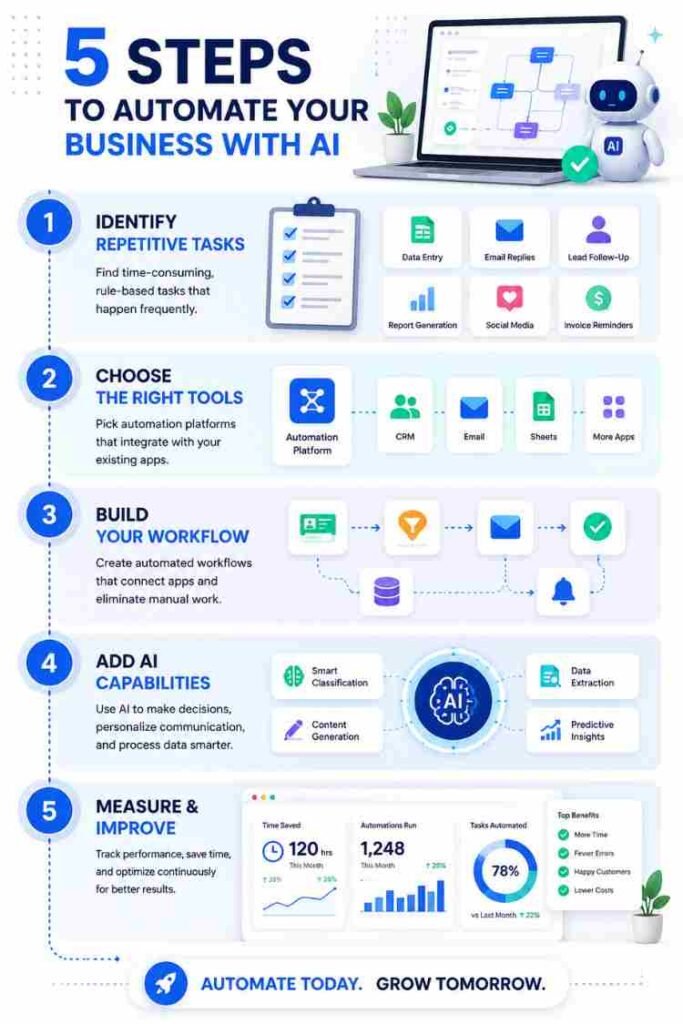
Step 1: Identify Which Business Processes to Automate First
Before you touch any tool, spend one hour writing down the ten most time-consuming repetitive tasks in your business. Think about anything you or your team do more than once a week in a predictable, rule-based way. Common examples include:
- Sending follow-up emails after enquiries
- Moving data between spreadsheets and CRM systems
- Posting content across social media channels
- Generating weekly reports from fixed data sources
- Routing customer support messages to the right team member
- Sending payment reminders to clients
- Processing and logging incoming invoices
For each task, note three things: how long it takes, how often it happens, and whether it follows a consistent set of steps. Tasks that are frequent, time-consuming, and rule-based are your highest-priority automation candidates. Tasks that require subjective judgement, relationship nuance, or creative input are not good candidates for automation and should stay with your team.
Step 2: Choose the Right AI Automation Tool for Your Business
Three tools dominate the no-code and low-code automation space in 2026. Each has a different sweet spot, and choosing the wrong one for your scale is one of the most common mistakes I see.
Zapier is the most widely adopted and easiest to start with. Zapier connects 8,000+ apps with no-code interfaces and an intuitive drag-and-drop builder, and non-technical users report building a useful automation in under five minutes. The free plan covers 100 tasks per month — enough to test a couple of automations before committing. The Professional plan starts at $19.99 per month for 750 tasks on annual billing, though you can verify current tiers on Zapier’s official pricing page. Zapier introduced Copilot in 2026, an AI-powered builder that turns plain English descriptions into working automation scaffolds.
The important caveat: Zapier charges per task, where each individual action step counts separately. A five-step workflow running 1,000 times consumes 5,000 tasks. At high volume, costs compound rapidly.
Make.com (formerly Integromat) gives you more visual control over complex multi-step workflows at a lower cost per operation. The free plan includes 1,000 monthly operations, and the Core plan starts at $10.59 per month. Make uses an operation-based system that is more granular than Zapier’s task counting but significantly cheaper at scale. If your automations involve branching logic, conditional paths, or higher volumes, Make is the natural step up from Zapier.
n8n is the choice for businesses that want full control and predictable costs at scale. n8n counts the entire workflow run as one execution regardless of how many steps it contains — a 20-node workflow processing 500 records counts as one execution, making it dramatically cheaper than task-based pricing at any meaningful volume. The cloud Starter plan runs at approximately $20 per month. The self-hosted Community Edition is completely free and runs on a $5 virtual private server. n8n ships 70+ native AI nodes, making it the strongest option for AI-heavy workflows. The trade-off is a two to four week learning curve for non-technical users.
Here is how the three tools compare at a glance:
| Tool | Free Plan | Paid From | Pricing Model | Best For | Difficulty |
|---|---|---|---|---|---|
| Zapier | 100 tasks/month | $19.99/month | Per task (each action step) | Beginners, simple workflows | Easy |
| Make.com | 1,000 ops/month | $10.59/month | Per operation | Mid-complexity, branching logic | Moderate |
| n8n (cloud) | No | ~$20/month | Per workflow run | AI-heavy, high volume, developers | Moderate–Advanced |
| n8n (self-hosted) | Free | Server cost only | Per workflow run | Maximum control and cost savings | Advanced |
Pricing verified as of June 2026 on annual billing.
For most small business owners starting out, Zapier is the right first tool. Once you have automated five to ten workflows and understand what your task volumes look like, you will have the information needed to decide whether Make or n8n makes more financial sense for your operation.
Step 3: Build Your First Workflow and Prove the Value
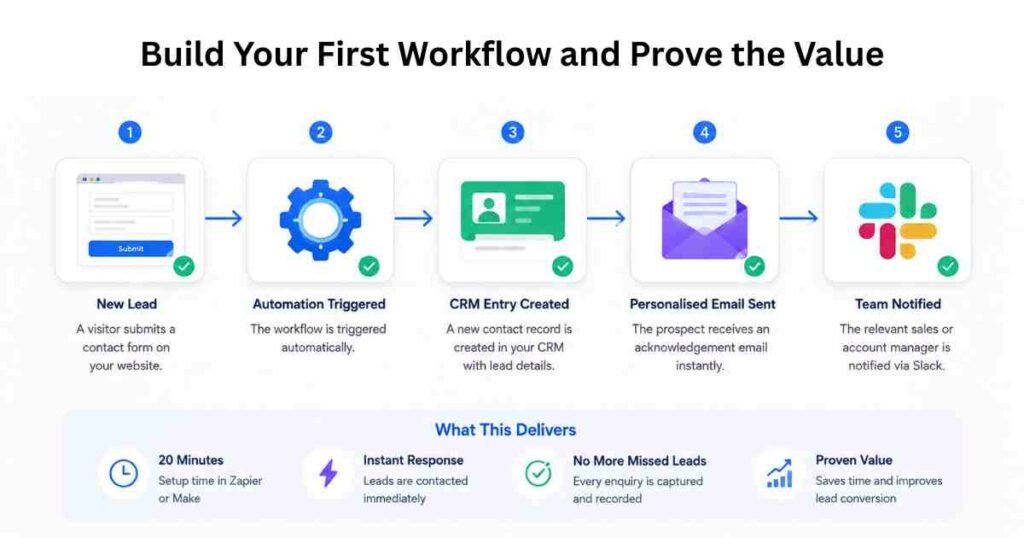
Do not try to automate five things simultaneously. Pick the single highest-impact task from your list and build one clean workflow. Run it for two weeks, monitor it, then move to the next.
Example 1: New lead notification and CRM entry When someone submits a contact form on your website, the automation creates a contact record in your CRM, sends the prospect a personalised acknowledgement email, and alerts the relevant sales or account manager via Slack or messaging app. This takes about 20 minutes to set up in Zapier or Make and immediately removes a manual touchpoint that often gets missed or delayed during busy periods.
Example 2: Social media scheduling automation Connect your content calendar (Google Sheets or Notion) to a scheduling tool like Buffer or Later. When a new row is added to the sheet with content, date, and platform, the automation creates a scheduled post on the relevant social channels automatically. This removes the daily manual task of logging into each platform to post content, and ensures posting happens consistently even when the team is busy.
Example 3: Invoice processing and payment reminders When a new invoice is created in your accounting tool (Xero, QuickBooks, or FreshBooks), the automation logs it in a tracking spreadsheet and triggers a payment reminder email sequence — a polite first reminder at seven days, a firmer follow-up at 14 days, and a final notice at 21 days. The sequence stops automatically when the invoice is marked as paid. This is one of the highest-ROI automations for service businesses because it eliminates the awkward manual chase and ensures no overdue invoice is forgotten.
Step 4: Layer in AI Capabilities for Smarter Workflows

Basic workflow automation connects apps and moves data. AI automation adds a layer of intelligence — understanding, generating, and classifying content within those workflows — that transforms what is possible.
Once you are comfortable with your first few standard automations, you can add AI steps powered by large language models. Zapier’s AI actions allow you to include a ChatGPT or Claude step anywhere in a workflow. Make.com has equivalent modules. n8n has native AI agent nodes that can plan and execute multi-step tasks autonomously without a fixed sequence being programmed for every scenario.
Practical AI steps worth adding to existing workflows include:
- Summarising incoming customer support emails before routing them to the right team member
- Classifying inbound messages by urgency, topic, or sentiment before they reach your CRM
- Generating first-draft responses to common customer enquiries for agent review
- Extracting key data from unstructured documents like invoices, contracts, or application forms
- Writing first-draft social media captions from a bullet-point content brief
For businesses that handle significant inbound customer communication, combining workflow automation with AI classification and response drafting is where the largest time savings occur. Our Perplexity AI Review 2026 is also worth reading if you want to understand how AI handles real-time research tasks that feed into your automated workflows. The article on best AI tools for customer service 2026 covers several platforms that integrate directly with Zapier and Make for handling inbound communications.
Step 5: Measure Results, Fix Errors, and Expand Systematically
Automation is not a set-and-forget exercise. Zapier and Make both provide execution logs with error details. Set a monthly calendar reminder to review these logs, fix any broken workflows, and identify one new process to automate.
The metrics worth tracking from day one are: number of workflows running, total tasks handled per month, error rate per workflow, and estimated hours saved. Most businesses that track these consistently find they have automated 15 to 20 core workflows within six months, at which point the time and cost savings become significant enough to justify more investment in the programme.
Real-World Results: What to Expect in the First 90 Days
Based on my consulting work with small business clients across different sectors, here is what realistic automation results look like over a 90-day period.
Days 1 to 30:
After setting up three to five core workflows covering lead capture, follow-up emails, and data entry, most teams recover four to eight hours per week. That is usually enough to demonstrate the value internally and get buy-in from any sceptical team members.
Days 31 to 60:
With 10 to 15 workflows running, teams typically report that the most error-prone manual processes have been eliminated. Data accuracy improves because human copy-paste errors are removed from the system. Response times to customer enquiries drop because automated acknowledgements go out immediately rather than waiting for a team member to notice a new message.
Days 61 to 90:
Businesses with a systematic approach are running 20 or more workflows and beginning to introduce AI steps for content generation and message classification. This is when you start to feel the compounding effect: the cumulative time saved is no longer just a few hours a week but half a day or more, and that time can be redirected to revenue-generating activities.
For context on the broader strategic picture, our guide on how to use AI for small business growth covers how automation fits into a wider AI adoption plan including marketing, sales, and customer experience.
Common Mistakes to Avoid
- Automating a broken process. Automation amplifies whatever process it is built around. If your sales follow-up is inconsistent, automating it makes it consistently inconsistent. Fix the process logic first, then automate it.
- Choosing the wrong tool for your scale. At 10,000 tasks per month, Make is approximately 70% cheaper than Zapier, and self-hosted n8n is 95% cheaper for identical workloads. Do the cost mathematics before committing to an annual plan, especially if you expect your task volumes to grow.
- Building automations nobody monitors. Every automation needs an owner who checks execution logs monthly. Errors accumulate silently if nobody is watching, and a broken automation that was supposed to send payment reminders can cost you significantly more than the time it was saving.
- Trying to automate everything in week one. Scope creep kills automation projects. Start with one workflow, verify it works cleanly, then expand. Businesses that try to overhaul their entire operation simultaneously usually end up with a tangle of partially working workflows that nobody fully understands.
- Skipping the testing phase. Every new automation should run against test data before going live. Verify that each step fires correctly and check that any generated emails or messages look right before they reach real customers or clients.
- Ignoring the digital transformation layer. Automation works best when your underlying data is clean and your systems are connected. Businesses with siloed tools and inconsistent data get far less value from automation than those with a coherent, integrated tech stack. Before automating, check that your CRM, email platform, and project management tool can actually talk to each other via API or native integration.
What Business Owners Ask About AI Business Automation
How much does it cost to automate a small business with AI?
For most small businesses, a solid automation setup costs between $30 and $60 per month. Zapier’s Professional plan starts at $19.99 per month, Make.com’s Core plan at $10.59 per month, and n8n’s cloud Starter plan at approximately $20 per month. Many businesses begin on free plans to test their first few workflows before committing. The return on investment typically far exceeds the monthly cost within the first 60 days, particularly when you factor in the staff hours freed up across the team.
Do I need technical skills to automate my business with AI?
No. Zapier and Make.com are built specifically for non-technical users with visual drag-and-drop interfaces. Zapier’s Copilot feature lets you describe what you want in plain English and builds the automation for you. n8n has a slightly steeper learning curve but remains accessible without coding knowledge for most standard workflows. The majority of common business processes can be automated without writing a single line of code.
What is the difference between workflow automation and agentic AI?
Workflow automation follows fixed sequences of steps: if X happens, do Y, then Z. Agentic AI adds autonomous decision-making — the system plans what steps to take, decides which tools to call, and adapts based on the result of each action. For most small businesses in 2026, standard workflow automation is the right starting point. Agentic AI becomes relevant once you are handling high volumes of varied inbound content that cannot easily be handled by fixed rules.
What business processes are easiest to automate first?
The easiest processes follow consistent, rule-based steps: lead capture and CRM entry, follow-up email sequences, invoice reminders, social media scheduling, weekly report generation, and routing inbound messages. These have clear triggers and predictable outputs, making them straightforward to build and reliable once running.
How long does it take to set up a business automation?
A simple two-step automation — such as adding a form submission to a spreadsheet — takes under 10 minutes. A more complex workflow with conditional logic, multiple actions, and an AI step typically takes 30 to 90 minutes to build and test properly. Most business owners can implement their first three to five automations within a single afternoon.
Is it safe to use AI automation for client data?
Reputable platforms like Zapier, Make.com, and n8n comply with GDPR and hold SOC 2 Type II certifications. Review what data each automation processes and ensure it aligns with your privacy policy and client agreements. Avoid passing sensitive personal or financial data through automation workflows unless you have confirmed the security standards of every app in the chain.
The businesses that get the most from AI-powered automation are not the ones that bought the most expensive tools or built the most complex workflows on day one. They are the ones that started with a single process, proved the value, and built a consistent habit of looking for the next opportunity.
Pick one task from your list this week and build your first automation. The compounding effect starts the moment you stop doing manually what a well-built workflow can handle for you.
This article was written by Jordan Clarke for AI Genius Optimizer. We only recommend tools proven to deliver real business results. Some links may be affiliate links.